SQL CREATE SCHEMA Statement
tags: #sql/basic_statements
What is a schema?
A schema is a collection of database objects including tables, views, triggers, stored procedures, indexes, etc. It defines the structure and organization of the data within the database, managed by a database management system.
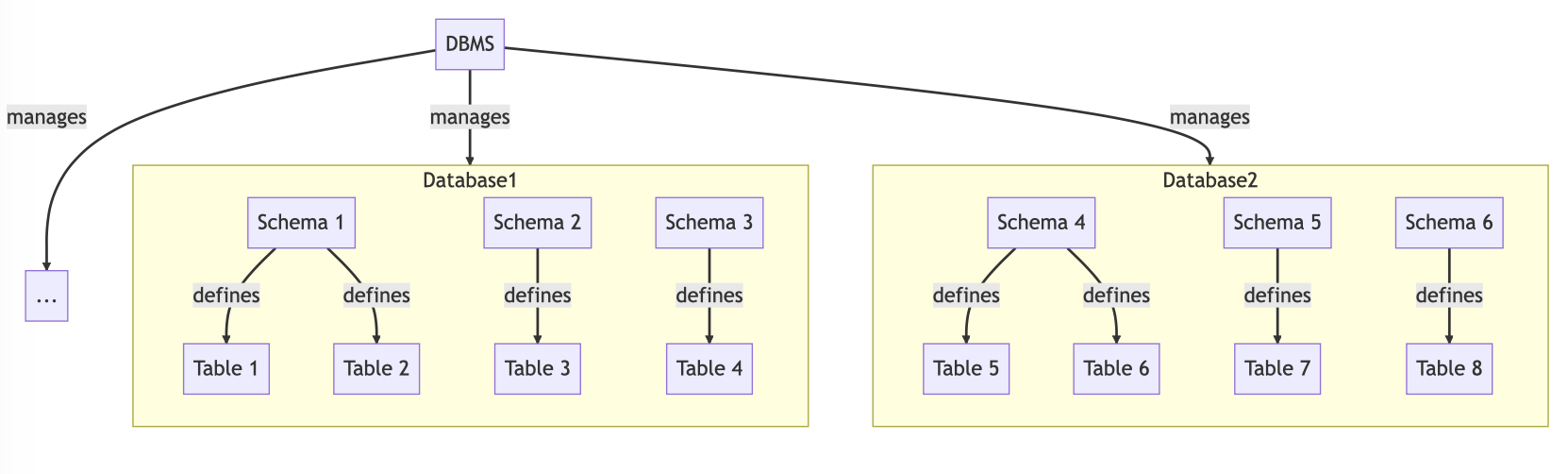
NOTE: In most relational database management systems (RDBMS), a database can have multiple schemas.
For example, if a database has a schema named "sales," then all tables, views, and other objects related to the sales department of an organization would be included in this schema. The database administrator or a developer, can define permissions and access controls for the objects within the schema to specific users (i.e., who can access the specific data).
Why would we use multiple schemas?
- To logically separate different types of objects or data within a single database.
- To separate different user groups or applications that are using the same database (such that each user group or application only has access to the data they need).
Initializing a database schema
This command is not used very commonly. Often times the company will already have a database created for you to work on.
The CREATE SCHEMA statement defines a schema:
CREATE SCHEMA <schema_name>
- The
schema_nameis the identifier used to define the schema - Must not use a name that already exists for a schema
Within the same statement, we can grant privileges on objects:
CREATE SCHEMA <db_name> AUTHORIZATION "<authorization_name>"
- Identifies the user who is the owner of the schema (typically the database administrator)
- We can list more than one administrators
How to add objects to a schema?
Once the schema has been defined, we can create objects for the schema.
To explicitly create object in a given database, we can use the dot notation following the given syntax after the command DATABASE_NAME.OBJ_NAME.
1. Creating tables
CREATE TABLE tableName
2. Creating views
CREATE VIEW view_name AS
SELECT column1, column2, ...
FROM table_name
WHERE condition;
3. Creating an index
CREATE INDEX index_name
ON table_name (column1, column2, ...);
4. Creating a trigger
- See also: Creating Triggers
// Before triggers (example task: insert or update on)
CREATE TRIGGER trigger_name
BEFORE INSERT OR UPDATE ON table_name
FOR EACH ROW
BEGIN
  -- statements here
END;


// After triggers
CREATE TRIGGER trigger_name
AFTER INSERT OR UPDATE ON table_name
FOR EACH ROW
BEGIN
  -- statements here
END;
5. Creating a function
CREATE FUNCTION function_name(param1 datatype, param2 datatype, ...) RETURNS return_datatype
BEGIN
  -- statements here
  RETURN value;
END;