Python Strings
1. What are Python Strings?
Python strings are "immutable" which means they cannot be changed after they are created. Instead, we construct a new string.
In Python, the str class are sequences of characters and represent texts.
They are defined by single or double quotations:
'This is a string'
"This is also a string"
A string that contains no characters, is an empty string:
""
Multi-line Strings
Multi-line string are defined by triple quotations:
"""
Lorem ipsum dolor sit amet,
consectetur adipiscing elit,
sed do eiusmod tempor incididunt
ut labore et dolore magna aliqua.
"""
Concatenating Strings
We can link str values together using the + operator. This is referred to as concatenation.
We can also concatenate a string with one or more copies of itself using the * operator followed by a number that specifies how many times to multiply the string
Example:
facebook = "Facebook's rating is"
fb_rating_str = str(3.5) # we have to convert this to a string as we cannot perform arithmetical operations between strings and integers/floats

fb = facebook + ' ' + fb_rating_str

print(fb)
Facebook's rating is 3.5
2. Indexing Strings
As strings are a sequence of characters, we can access each character in a string using the standard index operator.
fruit = 'banana'
letter = fruit[1]

print(letter)
Output: a
Using the index() function
We can also use the index() method on strings:
string.index(substring, start, end)
substring: The substring whose index is to be found.start(optional): The starting index for the search (default is 0).end(optional): The ending index for the search (default is the end of the string).
This returns the index of the first occurrence of the substring in the given string object.
If the substring is not found, a ValueError is raised. To handle this situation, you can use a try-except block:
sentence = "Python is easy and Python is fun!"

try:
    index = sentence.index("Java")
    print("Index of 'Java':", index)
except ValueError:
    print("'Java' not found in the sentence.")
'Java' not found in the sentence.
3. String Methods and Operations
3.1. Common String Methods
str.lower() and str.upper()
s = "Hello, World!"
lowercase_version = s.lower()
uppercase_version = s.upper()
hello, world!
HELLO, WORLD!
Removing Leading and Trailing Whitespaces
Remove spaces at the beginning and at the end of the string using `strip():
s = "   Hello, World!   "
stripped_string = s.strip()
print(stripped_string)
Hello, World!
To remove only trailing whitespaces from a string, we can use rstrip():
s = "   Hello, World!   "
right_stripped_string = s.rstrip()
print(right_stripped_string)
Hello, World!
str.startswith() and str.endswith()
Both are boolean methods. Returns True if the string starts (or ends) with the specified argument and False otherwise:
string.startswith(value, start, end)

# Start and End to specify index range for the search (optional)
Parsing Strings Using str.find()
We can use the find() method to look into a string and find a substring by specifying the substring value.
This returns the index position of the first occurrence of the specified value, and returns -1 if the value is not found.
str.find(value, start, end) # value can also be a substring (i.e., >1 char)
Example:
txt = "Hello, welcome to my world."

x = txt.find("e")

print(x)
1
Example of a more complex syntax:
data = 'From stephen.marquard@uct.ac.za Sat Jan  5 09:14:16 2008'

atpos = data.find('@') # finding position for @
print(atpos)

sppose = data.find(' ', atpos) # find the space, starting at `atpos` which is 21
print(sppos)

host = data(atpos+1:sppos) # extracting from atpos (21+1) -> position 22 up to but not including sppos which is position #31
Output:
>>>print(atpos)
21
>>> print(sppos)
31
>>> host
uct.ac.za
Replacing Characters Using str.replace()
All occurrences of the specified phrase will be replaced, if nothing else is specified. This can be specified using the count parameter in specifying how many occurrences of the old value you want to replace. Default is all occurrences.
Returns a string where a specified value is replaced with a specified value:
str.replace(oldvalue, newvalue, count)
Splitting Strings with str.split()
The split() method breaks a string into a list of words. By default, any number of whitespace characters is considered a word boundary:
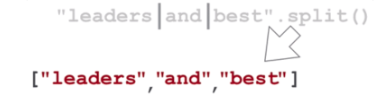
This optional delimiter parameter can be used to specify which characters to use as word boundaries:
str.split(deliminer, maxsplit)

# Maxsplit - Specifies how many splits to do. Default value is -1, which is "all occurrences"
Joining Strings with separator_string.join()
This is the inverse of the str.split() method.
seperator_string.join(iterable)
The str.join() method in Python is a string method that concatenates elements of an iterable (e.g., a list, tuple, or string) into a single string, using the original string (the one on which the method is called on) as a separator between the elements. The str.join() method returns a new string:
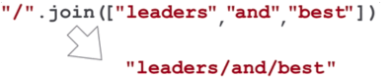
separator = ", "
elements = ["apple", "banana", "orange"]

# Join the elements with ", " as the separator
result = separator.join(elements)
print(result)
apple, banana, orange
4. Reversing Strings
here is no built-in function to reverse a String in Python.
The fastest way is to use a slice that steps backwards, -1.
Example: Reverse the string "Hello World"
original_string = "Hello, World!"
reversed_string = original_string[::-1]
print(reversed_string)
The slice statement [: :-1] means start at the end of the string and end at position 0, move with the step -1, negative one, which means one step backwards.
5. String Comparisons
You can compare strings using various comparison operators.
Strings are compared lexicographically (in dictionary order), meaning the comparison is based on the Unicode code points of the characters. The comparison is performed character by character until a difference is found.
str1 = "apple"
str2 = "banana"

if str1 < str2:
    print("str1 comes before str2")
else:
    print("str1 comes after or is equal to str2")
str1 comes before str2
Case Sensitivity
May be useful to convert both strings to lower or uppercase before comparing.
By default, string comparisons are case-sensitive.
Uppercase letters have lower Unicode code points than their lowercase counterparts, so in lexicographic order, uppercase letters come before lowercase letters.
str1 = "apple"
str2 = "Apple"

if str1 == str2:
    print("Strings are equal (case-sensitive)")
else:
    print("Strings are not equal (case-sensitive)")
Strings are not equal (case-sensitive)
6. String Formats Using str.format()
The str.format() method in Python is a string formatting method that allows you to create formatted strings by substituting placeholders {} with values:
formatted_string = "Hello, {}!".format(value)

# VALUE: is the actual value that will repalce the placeholder
Multiple placeholders can be used:
# Position-based passing
formatted_string = "Hello, {}! My name is {}.".format(name, your_name)

# Kwarg Argument Passing
formatted_string2 = "My name is {n}. I am {a} years old.".format(n=name, a=age)

# Both
formatted_string3 = "My name is {}. I am {a} years old.".format(name, a=age)
You can specify the data format inside the curly braces {} within the str.format() method by using format specifiers. Format specifiers are a concise way to control the formatting of the inserted values. They follow the syntax {field_name:format_spec}.
7. F-Strings (Formatted String Literals)
F-strings are string literals that have an "f" at the beginning and curly braces containing expressions that will be replaced with their values.
This provides a concise and convenient way to embed expressions inside string literals:
name = "Alice"
age = 30

# F-string
formatted_string = f"My name is {name} and I am {age} years old."
print(formatted_string)
My name is Alice and I am 30 years old.